Read your requirement
The Rebirth icon on your main HUD displays a glowing notification indicator, but that dot does not mean you have qualified for the upgrade. It only signals that the menu is available to open.
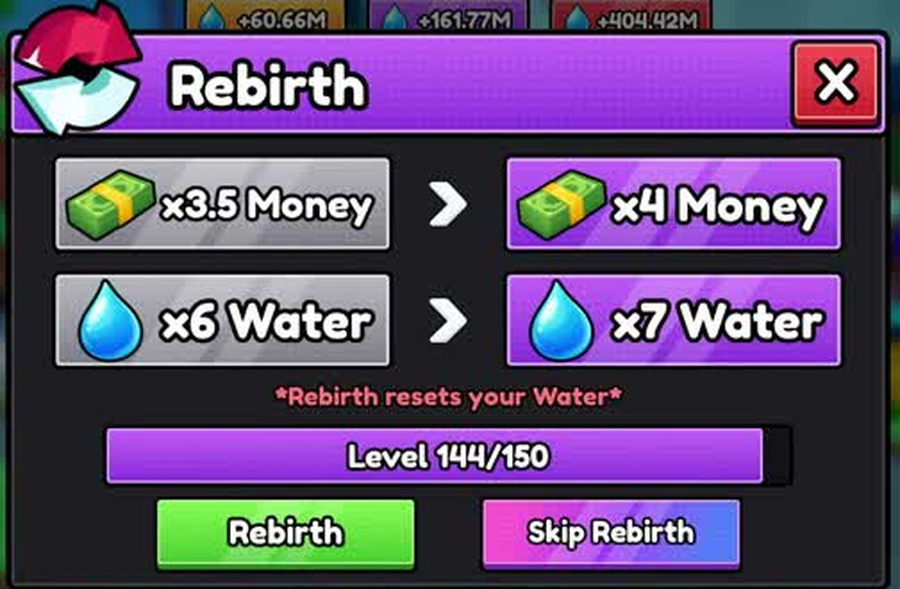 One recorded panel, one account. The level target, the two bonuses and the reset warning all appear together.
When you click the button, look directly at the level counter displayed in the center of the confirmation window. On one recorded gameplay session (frame BEV_120.jpg), the interface displayed:
- Current Level:
144 - Required Level:
150 - Displayed Ratio:
Level 144/150
The requirement of level 150 represents the threshold captured for that specific player's milestone, not a universal first-rebirth requirement or a fixed mathematical formula. Always verify that your current level matches or exceeds the required number before planning your route.
If you are short of the requirement, choose an upgrade by your bottleneck to speed up your remaining levels.
Compare both bonuses
The Rebirth system grants two separate account bonuses rather than a single combined boost. Check both stats on the confirmation screen before accepting:
| Bonus | Before | After | Change |
|---|---|---|---|
| Money | x3.5 Money | x4 Money | +0.5x |
| Water | x6 Water | x7 Water | +1.0x |
On this recorded panel, the Money multiplier increased from x3.5 to x4, while the Water multiplier rose from x6 to x7. A later screen in World 4 captured a prompt reading Renaissance ! Votre multiplicateur est maintenant x32 / x33, indicating that multipliers scale into much higher brackets as you progress.
Because multiplier gains vary across different tiers, do not assume every rebirth adds exactly +0.5x Money and +1.0x Water.
What the warning says
Directly below the stat comparisons, the interface displays an explicit warning label:
WARNING
*Rebirth resets your Water*
This message confirms that confirming a rebirth instantly sets your collected Water balance back to zero. You must gather water again to unlock higher-tier gates and reservoirs.
Several account persistence rules remain unconfirmed from available gameplay frames:
- Whether accumulated Money survives the reset
- Whether unlocked pets and active pet slots are preserved
- Whether purchased pumps stay in your inventory
- Whether discovered items on the Index panel carry over
To verify how your account behaves, note your exact cash balance and Index item count immediately before initiating your first rebirth, then check both values as soon as you respawn. Make sure you check active pet multipliers to help quickly regain lost water reserves after resetting.
Two buttons, not one
The confirmation window presents two distinct action buttons at the bottom of the dialog:
- Rebirth: The standard progression button that executes the reset once you satisfy the level requirement.
- Skip Rebirth: A secondary option placed alongside the standard button.
What Skip Rebirth costs, and whether it bypasses the level requirement or the Water reset, was not captured in recorded gameplay. The panel shows the button without pricing it, so treat both possibilities as open until you read it in your own game.
If you decide to proceed with the standard reset, check the lake capacity ladder to calculate the volume needed to rebuild your reserves across early zones.